

文档Docs
用 Agents Relay 配置后台执行工具Set up background tools with Agents Relay
大陆推荐豆包 Pro 做主线程,Claude Code 或 Codex 走官方账号或 Agents Relay 在后台执行;按安全 Prompt 配置,密钥不进聊天。Keep Doubao Pro as your main Agent in mainland China, and give Claude Code or Codex a background role through an official account or Agents Relay without sharing a key in chat.
Agents Relay 是第三方模型服务,可给 Claude Code、Codex CLI 和 OpenCode 提供接入所需的套餐与 API 密钥。它不是 Agent J 的服务;套餐价格、可用模型和服务地区以 Agents Relay 的页面为准,Agent J 不代收费用。
大陆推荐怎么用
在中国大陆,推荐让豆包最新 Pro 模型(火山方舟)做 Agent J 主线程,手机上的对话由它持续接住;Claude Code 和 Codex 无论用官方账号还是 Agents Relay,都作为后台 headless 执行工具按任务调用,而不是切换成主线程。这套分工能在当地保持主对话稳定,又能把适合的任务交给其他工具。先按火山方舟配置主线程;如果只有 Agents Relay、没有 Claude Code 或 Codex 的官方账号,也先保留豆包主线程,再按下文配置后台工具。配置不等于改主线程;需要变更主线程时另看切换 AI 编程工具。
注意:不要把 API Key 发给豆包或任何聊天窗口。把不含密钥的安全 Prompt交给主线程,让它从本机下载的配置包完成配置。配置包含有密钥,只能留在自己的 Agent J 主机,不上传、不发聊天、不提交代码仓库。
购买套餐、创建密钥
- 在 Agents Relay 注册登录,根据想用的工具及可用模型选择并购买对应套餐。付款与套餐细节在服务商页面核对。
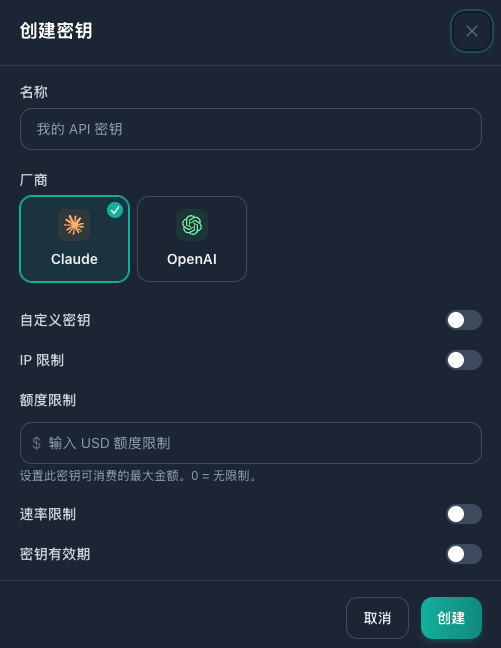
- 打开API 密钥页,点创建密钥。填一个自己认得的名称,其他选项保持默认;厂商选 Claude 或 OpenAI,与所买套餐及要配置的工具对应。创建后,密钥自动关联相应套餐,不用找别的设置。
下载配置包,把安全 Prompt 发给 Agent J
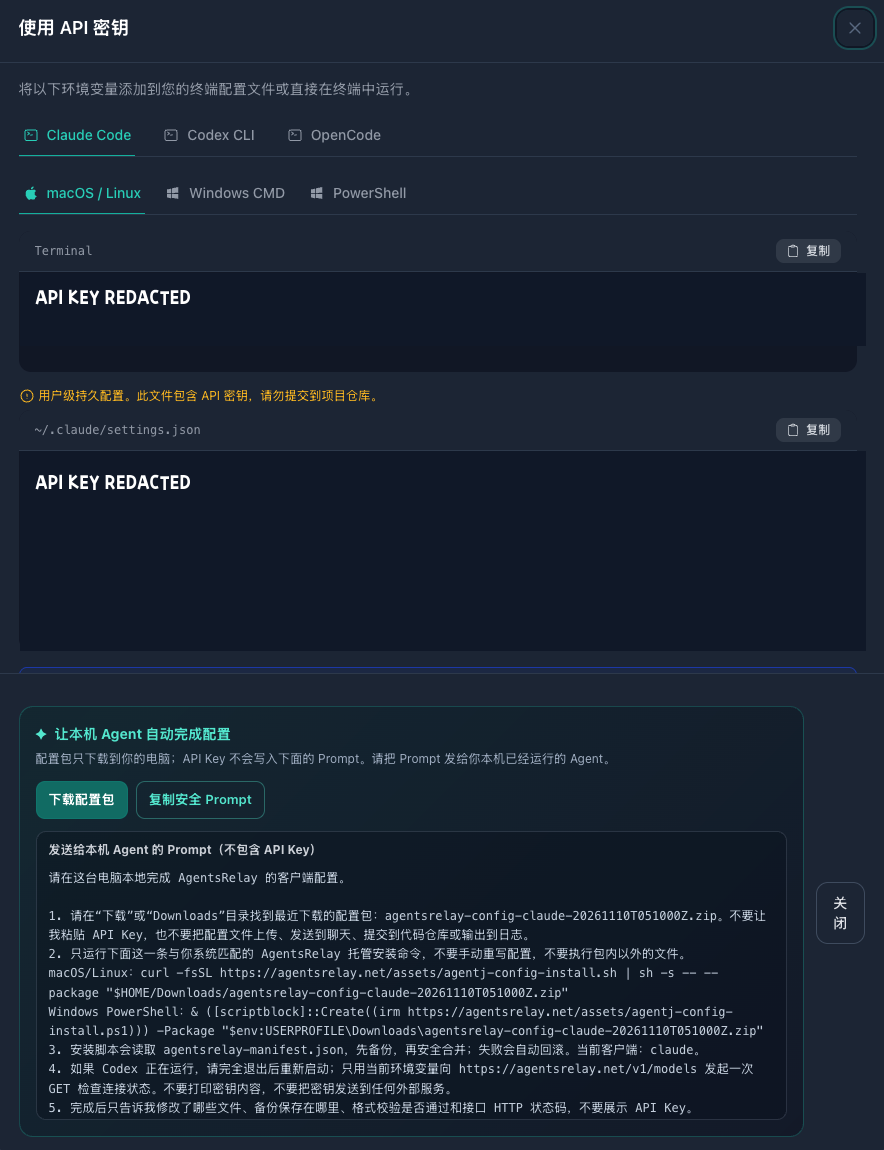
- 在密钥列表的「操作」栏点使用密钥。顶部选工具(Claude Code、Codex CLI 或 OpenCode)及Agent J 主机的系统(macOS / Linux、Windows CMD 或 PowerShell)。
- 点下载配置包,让文件留在本机的「下载」目录;不要解压后复制密钥到聊天。再点复制安全 Prompt,只把这段 Prompt 发给当前的 Agent J 主线程。Prompt 不含 API Key;密钥只在配置包中。不要复制页面上的含密钥终端命令或设置片段。
- 跟主线程补一句:请把这个配置成后台 headless 执行账号;豆包继续做主线程,不要切换主线程。只在本机按安全 Prompt 安装、检查;不要读取或回显密钥,不要上传配置包。先告诉我将改哪些设置。由它在 Agent J 主机上配置并报告结果。
也可以从侧栏的一键配置取得相同的配置包和安全 Prompt。只用下载配置包 + 安全 Prompt 这条路径,不用要求在终端粘贴密钥的备选方法。收到配置包的机器必须是Agent J 主机;手机下载的包不会自动到主机上。
怎么确认能用
让主线程在不打印或传递密钥的前提下,检查配置是否到位,再用刚配置的工具执行一个不读私人文件的最小后台 headless 任务,确认能收到回复。只报告工具名、是否成功及脱敏后的错误类型;不展示配置包内容、请求头或密钥末四位。若失败,先查下方报错和套餐状态,不要把密钥贴给客服或 Agent J。升级到 0.30.7 后,直接跟 Agent 说测中转,它会只读检查 Claude Code / Codex 连的域名并各发一条最短请求。
把任务交给 Claude Code 或 Codex
从 0.30.29 起,不管主 Agent 用哪家 AI,都可以经你的 Agents Relay 密钥把一项任务交给 Claude Code 或 Codex。不使用、也不改动你自己的 Claude Code 或 Codex 登录和设置。
- 在手机设置的「模型和 API Key」→ Agents Relay 里,按买的套餐保存密钥:Claude 密钥给 Claude Code,OpenAI 密钥给 Codex。密钥只在加密密钥卡里填写。
- 让主 Agent 把活交出去,比如“把这个 bug 交给 Claude Code”“让 Codex 写初稿”。开发类一般交给 Claude Code,写作和内容生产交给 Codex。
- 手机上会弹出 Face ID 确认卡,写明工具、目录、模型、时限和完整任务。看清再同意:任务随后在后台以 Agent J 主机上的完全权限运行,没有沙箱,也不逐步确认,运行期间持有这把密钥。
- 结果回到主 Agent,像密钥的内容会被隐藏。失败或中断的任务不会自动重跑。
任务内容、它读到的文件和回复都会经过 Agents Relay。含密码、密钥、客户资料、财务记录或生产权限的活,不要这样派。
主 Agent 使用的命令:
agentj relay status
agentj relay claude --full "<task>"
agentj relay codex --full "<task>"
想换回官方账号
先暂停后台任务,告诉主线程把刚才配置的后台工具恢复到官方登录,不要更改豆包主线程;先确认备份和影响范围。请它按配置包随附且核对来源的恢复说明操作,确认官方登录仍有效,再做一个最小任务验证;不要直接删除整个 Claude Code / Codex 设置目录。官方一键恢复脚本的准确命令待核验上线后补充,本页暂不提供未经验证的命令。
常见报错
| 报错 | 先查什么 |
|---|---|
| 401 未授权 | 在 Agents Relay 检查这把密钥是否启用、套餐是否到期;确认使用的是对应厂商的配置包。不要把密钥贴进聊天排查。 |
| 403 拒绝访问 | 核对账号/套餐权限和服务商的地区或访问限制;不要通过更换地区账号绕过限制。 |
| 404 找不到模型或接口 | 核对所选工具、厂商与套餐支持的模型;重新从使用密钥下载匹配的配置包,不要手改接口地址。 |
| 429 请求过多或额度不足 | 查看套餐额度、速率限制或余额,等限额重置或按服务商说明补充额度;避免反复自动重试。 |
| 订阅已到期 | 到服务商页面续订或改用自己的其他可用账号;主线程的豆包配置无需随之更换。 |
如果主线程本身失联,先按手机断线排查恢复主线程,再处理后台工具。有关 Agent J 本身的问题看常见问题;套餐和扣费找 Agents Relay。
Agents Relay is an independent model-access service. Its plans and API keys can connect tools such as Claude Code, Codex CLI and OpenCode. It is not operated by Agent J; check pricing, model availability and service regions on its own site. Agent J does not sell its plans.
A reliable setup in mainland China
For day-to-day conversation on your phone, use the latest Doubao Pro model on Volcano Ark as Agent J's main Agent. Give Claude Code and Codex a different job: run them headlessly in the background for specific tasks, whether your access comes from their official accounts or Agents Relay. This keeps your main conversation on a locally available model without giving up the tools you need for delegated work. Set up Volcano Ark first. If you have no official Claude Code or Codex account but do have Agents Relay, leave Doubao in charge and connect the relay as a background account. This procedure does not switch the main Agent; switching AI coding tools is a separate choice.
Keep the key off chat: send your main Agent only the site's safe prompt, not the API key, terminal exports or configuration text containing it. The downloaded configuration package contains the key. Keep it on your Agent J host, never in a repository, message or upload.
Buy a plan and create a key
- Sign in to Agents Relay, pick a plan for the tools and models you intend to use, and check its price and terms before paying.
- On API Keys, select Create Key. Enter a memorable name and leave the other options at their defaults. Under Vendor, choose Claude or OpenAI to match the plan you bought and the tool you want to configure. The key is associated with that plan automatically.
Download the package and send the safe prompt
- In the key list, find Actions → Use Key. Select your tool at the top (Claude Code, Codex CLI or OpenCode) and the host's operating system (macOS / Linux, Windows CMD or PowerShell).
- Select Download Configuration Package and keep it in the host's Downloads folder. Then select Copy Safe Prompt and send only that prompt to your current Agent J main Agent. The prompt contains no API key; the package does. Do not copy the page's terminal commands or settings excerpts that contain your key.
- Add: “Set this up only as a background headless account. Keep Doubao as my main Agent. Install and check it locally following the safe prompt; do not read out, print or upload the key or package. Tell me which settings will change before proceeding.” Let your main Agent perform the local setup and report the result.
The sidebar's One-click Setup also offers the package and safe prompt. Prefer that pair over the alternative that asks you to paste a key into a terminal. Download the package on the computer hosting Agent J: a file downloaded to your phone does not appear there automatically.
Verify the background account
Ask your main Agent to check that configuration is present without printing or transmitting the key, then run one small, headless background task with the newly configured tool that reads no personal files. It should report the tool, success or failure and a redacted error category—never package contents, request headers or a key suffix. If it fails, check the plan status and errors below. After upgrading to 0.30.7, just tell the Agent “check relay”: it checks, read-only, which domain Claude Code and Codex connect to and sends each one shortest request.
Hand a task to Claude Code or Codex
From 0.30.29 your main Agent, whichever AI it uses, can send one task to Claude Code or Codex through your Agents Relay key. It does not use or change your own Claude Code or Codex sign-in.
- On the phone, open Settings → Models & API keys → Agents Relay and save the key for each plan you bought: the Claude key for Claude Code, the OpenAI key for Codex. Enter it only on the encrypted key card.
- Ask your main Agent to hand the work over, for example “give this bug to Claude Code” or “have Codex write the draft”. Development usually goes to Claude Code; writing and content go to Codex.
- A Face ID card appears on your phone with the tool, folder, model, time limit and the whole task. Read it before you allow it: the job then runs in the background with full permissions on your Agent J host, without a sandbox or step-by-step confirmations, and holds the key while it runs.
- The result comes back to your main Agent with anything that looks like a key hidden. A failed or interrupted job is not re-run automatically.
The task, the files it reads and its replies pass through Agents Relay. Keep passwords, keys, customer data, financial records and production access out of these tasks.
Commands your main Agent uses:
agentj relay status
agentj relay claude --full "<task>"
agentj relay codex --full "<task>"
Return to an official account
Pause background tasks first. Tell your main Agent: “Restore the background tool we just configured to its official sign-in without changing Doubao as my main Agent. Show me the backup and impact first.” Have it follow recovery instructions included with the package and verified as authentic, confirm that the official sign-in still works and test a small task. Do not delete your entire Claude Code or Codex settings directory. We will add the exact one-step restore command after it is verified and available; this page does not guess at it.
If something fails
| Error | First place to look |
|---|---|
| 401 Unauthorized | Check that the key is active and the plan has not expired, and that the package matches the selected Vendor. Never paste the key into chat for debugging. |
| 403 Forbidden | Check plan/account permissions and service-region restrictions; do not bypass restrictions with another region's account. |
| 404 Model or endpoint not found | Check which models the selected plan and tool support, then download a matching package again via Use Key rather than editing endpoints by hand. |
| 429 Rate or quota limit | Check the plan's usage and rate limits or balance. Wait for a reset or follow the provider's top-up instructions; avoid repeated automatic retries. |
| Subscription expired | Renew with the provider or use another account you already have. Your Doubao main Agent does not need to change. |
If your main Agent is offline, restore your phone connection before working on the background tool. For Agent J issues see the FAQ; ask Agents Relay about its plan and billing.