

文档Docs
Agent J 是什么What Agent J is
用手机跟你电脑上的 AI 编程工具说话、批准它要做的事;开始之前要准备的东西都在这里。Talk to the AI coding tool on your own computer from your phone and approve what it wants to do — plus what you need before you start.
Agent J 让你用手机跟自己电脑上的 AI 编程工具说话。这个工具可以是 Claude Code、Codex、OpenCode、Kimi Code 或通义千问 Qwen Code,我们把它叫作你的 Agent。
你在手机上打字,电脑上的 Agent 去干活:写代码、做客服、创作内容、处理邮件、整理订单、做报表,再把结果发回手机。需要你点头的环节,它会在手机上弹窗问你,你点「批准」,它才动手。
这样你就不用一直守在电脑前。出门、开会、躺在沙发上,都能看着它干活。
Agent J 现在是 Beta 测试版,靠朋友介绍使用,还没有公开推广。
它是怎么工作的
- 电脑上装个小程序,叫
agentj。它启动 AI 编程工具,用的是你自己的账号、你自己的设置。 - 手机上打开网页版 App,跟电脑配对一次,以后打开就能用。
- 你的文件、对话、Agent 做出来的东西,都留在你自己的电脑上。我们看不到你们聊了什么,详见 数据安全。
开始之前要准备什么
| 要准备的 | 说明 |
|---|---|
| 一台电脑,或一台云服务器 | Mac 或 Linux 都行。Windows 要先装 WSL2,在 WSL2 里装。也可以装在你自己租的云服务器上(AWS、VPS 之类),见 常见问题。 |
| 一个 AI 编程工具 | Claude Code、Codex、OpenCode、Kimi Code(月之暗面 Kimi)、通义千问 Qwen Code(阿里云百炼)选一个,装好并登录。Claude Code 用你的 Claude 账号,Codex 用你的 ChatGPT 账号,Kimi Code 用你的 Kimi 会员,Qwen Code 用阿里云百炼的套餐,OpenCode 用你自己注册的模型账号。在中国大陆用 Kimi Code、Qwen Code 或 OpenCode(配阿里云百炼、火山方舟、智谱 GLM 或 DeepSeek),安装时电脑上的 AI 会带你配好。 |
| 一部手机 | iPhone 或安卓手机都行,用手机自带的浏览器,不用装 App。iPhone 想收锁屏提醒,要 iOS 16.4 或更新的系统。 |
| 一个邮箱 | 用来注册 Agent J 账号、买席位。 |
| 一张能在网上付美元的卡 | 在 Stripe 的付款页上付。如果别人已经替你付了席位,你不用付钱。 |
注意:现在没有安卓或 iPhone 的安装包。手机上用的是网页版 App,把它加到主屏幕后,点开就跟 App 一样。做法见 手机上怎么用。
几个说法
- Agent:在你电脑上替你干活的 AI 助手,也就是你的 Claude Code、Codex、OpenCode、Kimi Code 或通义千问 Qwen Code。
- 席位:付费的单位(按月或按年)。一个席位对应一个 Agent,一个 Agent 只住在一台电脑或一台服务器上,这台电脑叫主机。三者的关系见下面的办公桌。
- Agent J 账号:买席位、管理 Agent 的账号。谁都能注册,个人也一样,团队名称可以不填。
- 遥控器:你用来跟 Agent 说话的设备,手机、平板,或另一台电脑上的浏览器都算。一个 Agent 最多连 10 个遥控器。
- 配对:让一部手机认识你的电脑。手机扫码或粘贴链接,电脑上输入手机显示的 6 位码,再输你的遥控器配对密码。
- 遥控器配对密码:只有你知道、只存在你电脑上的密码。在终端里配对、在别的电脑上添加遥控器时,用它证明是你本人。有了它,别人或者 AI 自己都没法偷偷加一部手机进来。
席位、Agent 和主机:一张办公桌
席位、Agent、主机,说的其实是同一件东西,只是看的角度不同。拿公司里的一张办公桌来比就清楚了:
- 桌上那台电脑,就是主机:Agent 真正干活的地方,你的文件和对话都存在这里。
- 坐在桌前的人,就是 Agent:你每天打交道、派活的那一位。
- 那把椅子,就是席位:公司为这个工位付的钱,按月或按年算。
一张桌子上只有一台电脑、一把椅子、一个人。所以买一个席位,就是添一张桌子:配一台主机,坐一个 Agent。
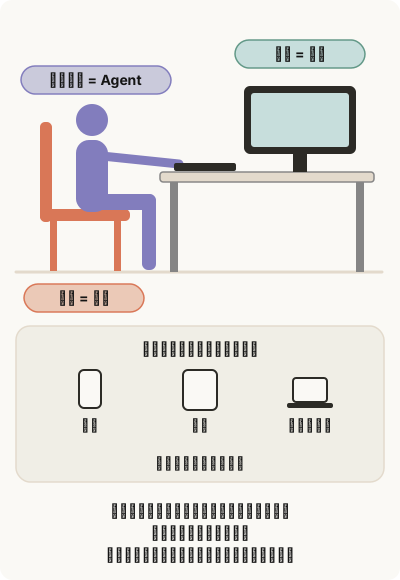
遥控器就是你联系这位员工的方式:你的手机、平板,或另一台电脑上的浏览器。不管从哪个遥控器发消息,找的都是同一个人,看到的也是同一段对话:在手机上说了一半,回到电脑浏览器上接着说,前面的话都在。
一人一个席位。 遥控器是给同一个人的几台设备用的,不是给几个人分着用的。几个同事共用一个席位,就像几个人挤在同一张桌前对着同一个人说话:谁说了什么,大家都看得见,指令也容易打架。团队里多一个人,就多买一个席位,相当于多摆一张桌子;每人用自己的电脑、连自己的手机,对话互相看不到。
多少钱
一个席位每月 20 美元,或每年 200 美元。详见 价格 和 账号与付款。
模型费用另算:Claude Code、Codex 或 OpenCode 背后的模型,照旧走你自己的订阅或模型账号,我们不经手。
下一步
了解Agent J 怎么干活,或浏览技能与工作流广场。工作流按 Workflow Design Bible 设计。
Agent J lets you talk to the AI coding tool on your own computer from your phone. That tool can be Claude Code, Codex, OpenCode, Kimi Code or Qwen Code; we call it your Agent.
You type on your phone, and the Agent does the work on your computer — write code, answer customers, create content, handle email, sort orders, build reports — then sends the result back. Whenever it needs your OK, it pops up a question on your phone, and it only goes ahead when you tap "Approve".
So you no longer have to sit at the computer. Out, in a meeting or on the sofa, you can still keep an eye on the work.
Agent J is in Beta: it is used by invitation and word of mouth, and is not advertised yet.
How it works
- A small program called
agentjruns on your computer. It starts your AI coding tool there, with your own account and your own settings. - On your phone you open a web app and pair it with the computer once. After that it's ready whenever you open it.
- Your files, your conversations and the Agent's work stay on your own computer. We can't see what you talk about — see Data security.
What you need
| You need | Details |
|---|---|
| A computer or a cloud server | A Mac or a Linux computer. On Windows, install WSL2 first and set it up inside WSL2. Your own rented cloud server (AWS, any VPS) works too — see the FAQ. |
| An AI coding tool | One of Claude Code, Codex, OpenCode, Kimi Code (Moonshot AI) or Qwen Code (Alibaba Cloud Model Studio), installed and signed in. Claude Code uses your Claude account, Codex your ChatGPT account, Kimi Code your Kimi membership, Qwen Code an Alibaba Cloud Model Studio (Bailian) plan, OpenCode a model account you sign up for yourself. In mainland China use Kimi Code, Qwen Code or OpenCode (with Bailian, Volcano Engine Ark, Zhipu GLM or DeepSeek); the AI on your computer walks you through it during setup. |
| A phone | Any iPhone or Android phone with its normal browser — nothing to install. For lock-screen alerts an iPhone needs iOS 16.4 or later. |
| An email address | To sign up for an Agent J account and buy a seat. |
| A card that can pay in US dollars online | You pay on Stripe's page. If someone else already paid for your seat, you pay nothing. |
Note: there is no Android or iPhone app to download yet. The phone side is a web app: add it to your Home Screen and it opens like any other app. See Using it on your phone.
A few words we use
- Agent — the AI assistant working for you on your computer: your Claude Code, Codex, OpenCode, Kimi Code or Qwen Code.
- Seat — what you pay for, monthly or yearly. One seat is one Agent, and one Agent lives on one computer or server, called its host. How the three fit together: see the desk below.
- Agent J account — where you buy seats and manage your Agents. Anyone can sign up, individuals too; a team name is optional.
- Remote — any device you talk to your Agent from: a phone, a tablet, or a browser on another computer. One Agent takes up to 10 remotes.
- Pairing — introducing a phone to your computer: the phone scans a QR code or takes a link, you type the 6-digit code it shows on the computer, then your remote pairing password.
- Remote pairing password — a password only you know, kept on your computer. It proves it's you when you pair at the computer's terminal or add a remote from another computer. It stops anyone else — the AI included — from quietly adding a phone.
Seat, Agent and host: one desk
A seat, an Agent and a host are not three things. They are one thing seen from three sides. Picture a desk in an office:
- The computer on the desk is the host. It is where the Agent actually works, and where your files and conversations are kept.
- The person sitting there is the Agent — the one you talk to and hand work to.
- The chair is the seat — what the company pays for that desk, by the month or by the year.
Each desk has one computer, one chair and one person. Buying a seat is adding a desk: one more host, one more Agent.
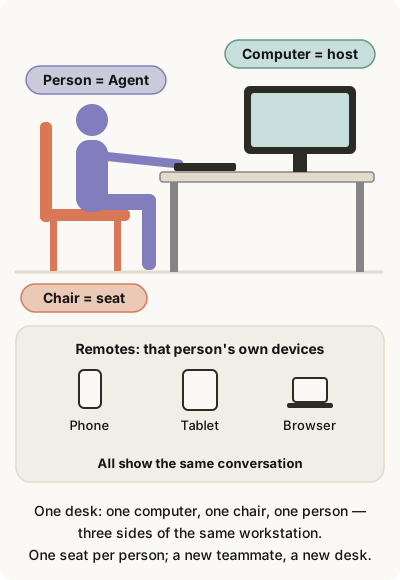
Remotes are how you reach that person: your phone, your tablet, a browser on another computer. Whichever one you pick up, you are talking to the same person in the same conversation. Start a thought on your phone, finish it in the browser at your desk, and everything said so far is there.
One seat per person. The five remotes are for one person's devices, not for sharing out. A team sharing one seat is several people crowding round one desk, all talking to the same person: everyone sees everything everyone else says, and instructions collide. When someone joins the team, buy one more seat — one more desk. Each person uses their own computer and their own phone, and nobody sees anybody else's conversation.
What it costs
$20 per seat per month, or $200 per seat per year. Details on the pricing page and in Account and billing.
The AI model is paid separately, as it is today: the model behind Claude Code, Codex or OpenCode runs on your own subscription or model account. We are not in between.
Next
- Ready to set it up: read Installing. All you do is send one sentence to the AI on your computer and step in a few times when it asks.
- First see how it is used: On your computer and On your phone.
- Opening an account, buying seats, giving a seat to someone else: Account and billing.
Read How Agent J works or browse the Skill and Workflow Plaza. Workflows follow the Workflow Design Bible.